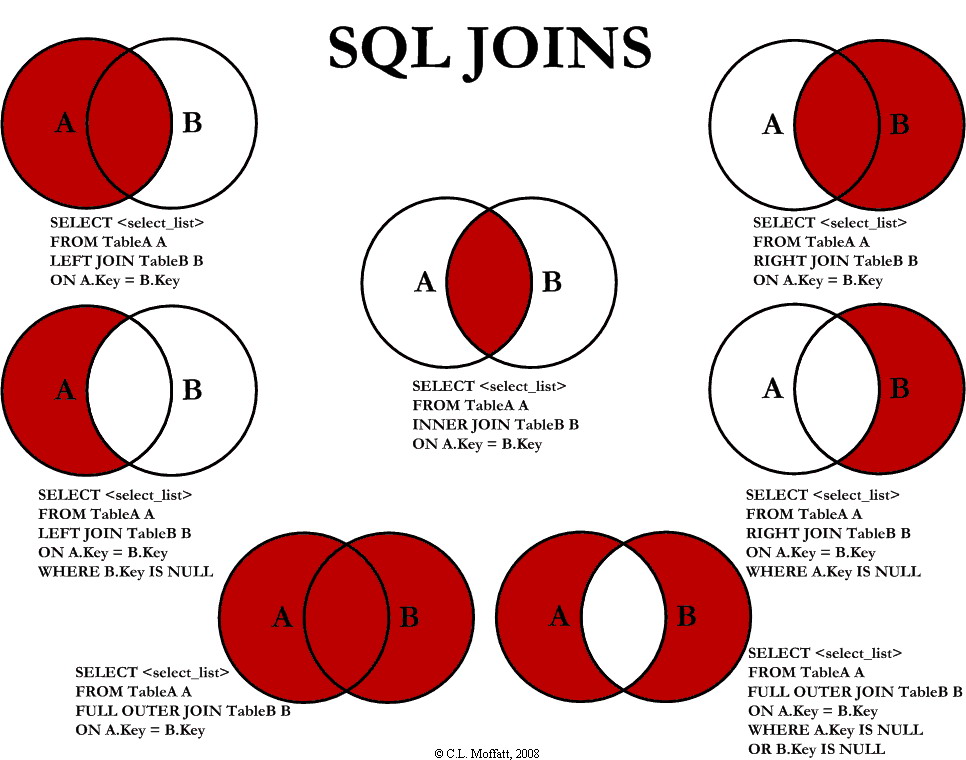
This article describes SQL Joins in a visual manner, and also the most efficient way to write the visualized Joins.
Introduction
This is just a simple article visually explaining SQL
JOINs.
Background
I'm a pretty visual person. Things seem to make more sense as a
picture. I looked all over the Internet for a good graphical
representation of SQL
JOINs, but I couldn't find
any to my liking. Some had good diagrams but lacked completeness (they
didn't have all the possible JOINs), and some were just plain terrible.
So, I decided to create my own and write an article about it.
Using the code
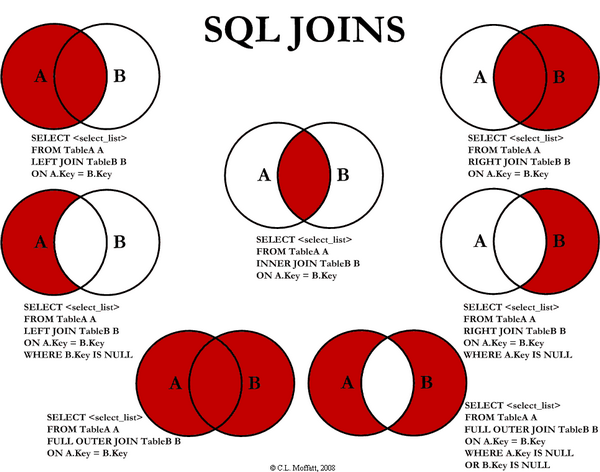
I am going to discuss seven different ways you can return data from
two relational tables. I will be excluding cross Joins and self
referencing Joins. The seven Joins I will discuss are shown below:
INNER JOINLEFT JOINRIGHT JOINOUTER JOINLEFT JOIN EXCLUDING INNER JOINRIGHT JOIN EXCLUDING INNER JOINOUTER JOIN EXCLUDING INNER JOIN
For the sake of this article, I'll refer to 5, 6, and 7 as
LEFT EXCLUDING JOIN,
RIGHT EXCLUDING JOIN, and
OUTER EXCLUDING JOIN,
respectively. Some may argue that 5, 6, and 7 are not really joining
the two tables, but for simplicity, I will still refer to these as Joins
because you use a SQL Join in each of these queries (but exclude some
records with a
WHERE clause).
Inner JOIN
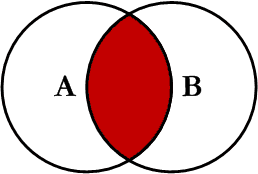
This is the simplest, most understood Join and is the most common.
This query will return all of the records in the left table (table A)
that have a matching record in the right table (table B). This Join is
written as follows:
Hide Copy Code
SELECT <select_list>
FROM Table_A A
INNER JOIN Table_B B
ON A.Key = B.Key
Left JOIN
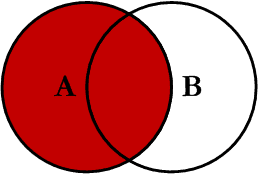
This query will return all of the records in the left table (table A)
regardless if any of those records have a match in the right table
(table B). It will also return any matching records from the right
table. This Join is written as follows:
Hide Copy Code
SELECT <select_list>
FROM Table_A A
LEFT JOIN Table_B B
ON A.Key = B.Key
Right JOIN
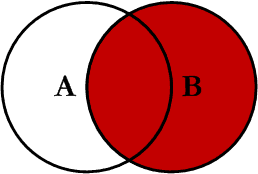
This query will return all of the records in the right table (table
B) regardless if any of those records have a match in the left table
(table A). It will also return any matching records from the left table.
This Join is written as follows:
Hide Copy Code
SELECT <select_list>
FROM Table_A A
RIGHT JOIN Table_B B
ON A.Key = B.Key
Outer JOIN
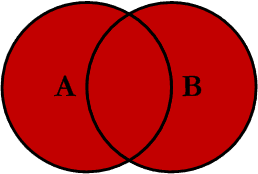
This Join can also be referred to as a
FULL OUTER JOIN or a
FULL JOIN.
This query will return all of the records from both tables, joining
records from the left table (table A) that match records from the right
table (table B). This Join is written as follows:
Hide Copy Code
SELECT <select_list>
FROM Table_A A
FULL OUTER JOIN Table_B B
ON A.Key = B.Key
Left Excluding JOIN
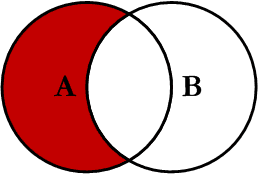
This query will return all of the records in the left table (table A)
that do not match any records in the right table (table B). This Join
is written as follows:
Hide Copy Code
SELECT <select_list>
FROM Table_A A
LEFT JOIN Table_B B
ON A.Key = B.Key
WHERE B.Key IS NULL
Right Excluding JOIN
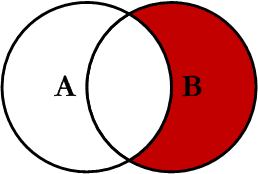
This query will return all of the records in the right table (table
B) that do not match any records in the left table (table A). This Join
is written as follows:
Hide Copy Code
SELECT <select_list>
FROM Table_A A
RIGHT JOIN Table_B B
ON A.Key = B.Key
WHERE A.Key IS NULL
Outer Excluding JOIN
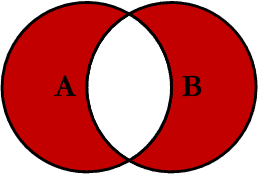
This query will return all of the records in the left table (table A)
and all of the records in the right table (table B) that do not match. I
have yet to have a need for using this type of Join, but all of the
others, I use quite frequently. This Join is written as follows:
Hide Copy Code
SELECT <select_list>
FROM Table_A A
FULL OUTER JOIN Table_B B
ON A.Key = B.Key
WHERE A.Key IS NULL OR B.Key IS NULL
Examples
Suppose we have two tables,
Table_A and
Table_B. The data in these tables are shown below:
Hide Copy Code
TABLE_A
  PK Value
---- ----------
   1 FOX
   2 COP
   3 TAXI
   6 WASHINGTON
   7 DELL
   5 ARIZONA
   4 LINCOLN
  10 LUCENT

TABLE_B
  PK Value
---- ----------
   1 TROT
   2 CAR
   3 CAB
   6 MONUMENT
   7 PC
   8 MICROSOFT
   9 APPLE
  11 SCOTCH
The results of the seven Joins are shown below:
Hide Copy Code
-- INNER JOIN
SELECT A.PK AS A_PK, A.Value AS A_Value,
       B.Value AS B_Value, B.PK AS B_PK
FROM Table_A A
INNER JOIN Table_B B
ON A.PK = B.PK

A_PK A_Value    B_Value    B_PK
---- ---------- ---------- ----
   1 FOX        TROT          1
   2 COP        CAR           2
   3 TAXI       CAB           3
   6 WASHINGTON MONUMENT      6
   7 DELL       PC            7

(5 row(s) affected)
Hide Copy Code
-- LEFT JOIN
SELECT A.PK AS A_PK, A.Value AS A_Value,
B.Value AS B_Value, B.PK AS B_PK
FROM Table_A A
LEFT JOIN Table_B B
ON A.PK = B.PK

A_PK A_Value    B_Value    B_PK
---- ---------- ---------- ----
   1 FOX        TROT          1
   2 COP        CAR           2
   3 TAXI       CAB           3
   4 LINCOLN    NULL       NULL
   5 ARIZONA    NULL       NULL
   6 WASHINGTON MONUMENT      6
   7 DELL       PC            7
  10 LUCENT     NULL       NULL

(8 row(s) affected)
Hide Copy Code
-- RIGHT JOIN
SELECT A.PK AS A_PK, A.Value AS A_Value,
B.Value AS B_Value, B.PK AS B_PK
FROM Table_A A
RIGHT JOIN Table_B B
ON A.PK = B.PK

A_PK A_Value    B_Value    B_PK
---- ---------- ---------- ----
   1 FOX        TROT          1
   2 COP        CAR           2
   3 TAXI       CAB           3
   6 WASHINGTON MONUMENT      6
   7 DELL       PC            7
NULL NULL       MICROSOFT     8
NULL NULL       APPLE         9
NULL NULL       SCOTCH       11

(8 row(s) affected)
Hide Copy Code
-- OUTER JOIN
SELECT A.PK AS A_PK, A.Value AS A_Value,
B.Value AS B_Value, B.PK AS B_PK
FROM Table_A A
FULL OUTER JOIN Table_B B
ON A.PK = B.PK

A_PK A_Value    B_Value    B_PK
---- ---------- ---------- ----
   1 FOX        TROT          1
   2 COP        CAR           2
   3 TAXI       CAB           3
   6 WASHINGTON MONUMENT      6
   7 DELL       PC            7
NULL NULL       MICROSOFT     8
NULL NULL       APPLE         9
NULL NULL       SCOTCH       11
   5 ARIZONA    NULL       NULL
   4 LINCOLN    NULL       NULL
  10 LUCENT     NULL       NULL

(11 row(s) affected)
Hide Copy Code
-- LEFT EXCLUDING JOIN
SELECT A.PK AS A_PK, A.Value AS A_Value,
B.Value AS B_Value, B.PK AS B_PK
FROM Table_A A
LEFT JOIN Table_B B
ON A.PK = B.PK
WHERE B.PK IS NULL

A_PK A_Value    B_Value    B_PK
---- ---------- ---------- ----
   4 LINCOLN    NULL       NULL
   5 ARIZONA    NULL       NULL
  10 LUCENT     NULL       NULL
(3 row(s) affected)
Hide Copy Code
-- RIGHT EXCLUDING JOIN
SELECT A.PK AS A_PK, A.Value AS A_Value,
B.Value AS B_Value, B.PK AS B_PK
FROM Table_A A
RIGHT JOIN Table_B B
ON A.PK = B.PK
WHERE A.PK IS NULL

A_PK A_Value    B_Value    B_PK
---- ---------- ---------- ----
NULL NULL       MICROSOFT     8
NULL NULL       APPLE         9
NULL NULL       SCOTCH       11

(3 row(s) affected)
Hide Copy Code
-- OUTER EXCLUDING JOIN
SELECT A.PK AS A_PK, A.Value AS A_Value,
B.Value AS B_Value, B.PK AS B_PK
FROM Table_A A
FULL OUTER JOIN Table_B B
ON A.PK = B.PK
WHERE A.PK IS NULL
OR B.PK IS NULL

A_PK A_Value    B_Value    B_PK
---- ---------- ---------- ----
NULL NULL       MICROSOFT     8
NULL NULL       APPLE         9
NULL NULL       SCOTCH       11
   5 ARIZONA    NULL       NULL
   4 LINCOLN    NULL       NULL
  10 LUCENT     NULL       NULL

(6 row(s) affected)
Note on the
OUTER JOIN that the inner joined
records are returned first, followed by the right joined records, and
then finally the left joined records (at least, that's how my Microsoft
SQL Server did it; this, of course, is without using any
ORDER BY statement).
You can visit the Wikipedia article for more info
here (however, the entry is not graphical).
I've also created a cheat sheet that you can print out if needed. If
you right click on the image below and select "Save Target As...", you
will download the full size image.
History
- Initial release -- 02/03/2009.
- Version 1.0 -- 02/04/2009 -- Fixed cheat sheet and minor typos.