Monday, January 11, 2021

MySQL Cursor

 Summary: in this tutorial, you will learn how to use MySQL cursor in stored procedures to iterate through a result set returned by a SELECT statement.

Introduction to MySQL cursor

To handle a result set inside a stored procedure, you use a cursor. A cursor allows you to iterate a set of rows returned by a query and process each row individually.

MySQL cursor is read-only, non-scrollable and asensitive.

  • Read-only: you cannot update data in the underlying table through the cursor.
  • Non-scrollable: you can only fetch rows in the order determined by the SELECT statement. You cannot fetch rows in the reversed order. In addition, you cannot skip rows or jump to a specific row in the result set.
  • Asensitive: there are two kinds of cursors: asensitive cursor and insensitive cursor. An asensitive cursor points to the actual data, whereas an insensitive cursor uses a temporary copy of the data. An asensitive cursor performs faster than an insensitive cursor because it does not have to make a temporary copy of data. However, any change that made to the data from other connections will affect the data that is being used by an asensitive cursor, therefore, it is safer if you do not update the data that is being used by an asensitive cursor. MySQL cursor is asensitive.

You can use MySQL cursors in stored proceduresstored functions, and triggers.

Working with MySQL cursor

First, declare a cursor by using the DECLARE statement:

DECLARE cursor_name CURSOR FOR SELECT_statement;
Code language: SQL (Structured Query Language) (sql)

The cursor declaration must be after any variable declaration. If you declare a cursor before the variable declarations, MySQL will issue an error. A cursor must always associate with a SELECT statement.

Next, open the cursor by using the OPEN statement. The OPEN statement initializes the result set for the cursor, therefore, you must call the OPEN statement before fetching rows from the result set.

OPEN cursor_name;
Code language: SQL (Structured Query Language) (sql)

Then, use the FETCH statement to retrieve the next row pointed by the cursor and move the cursor to the next row in the result set.

FETCH cursor_name INTO variables list;
Code language: SQL (Structured Query Language) (sql)

After that, check if there is any row available before fetching it.

Finally, deactivate the cursor and release the memory associated with it  using the CLOSE statement:

CLOSE cursor_name;
Code language: SQL (Structured Query Language) (sql)

It is a good practice to always close a cursor when it is no longer used.

When working with MySQL cursor, you must also declare a NOT FOUND handler to handle the situation when the cursor could not find any row.

Because each time you call the FETCH statement, the cursor attempts to read the next row in the result set. When the cursor reaches the end of the result set, it will not be able to get the data, and a condition is raised. The handler is used to handle this condition.

To declare a NOT FOUND handler, you use the following syntax:

DECLARE CONTINUE HANDLER FOR NOT FOUND SET finished = 1;
Code language: SQL (Structured Query Language) (sql)

The finished is a variable to indicate that the cursor has reached the end of the result set. Notice that the handler declaration must appear after variable and cursor declaration inside the stored procedures.

The following diagram illustrates how MySQL cursor works.

MySQL Cursor Steps

MySQL Cursor Example

We’ll develop a stored procedure that creates an email list of all employees in the employees table in the sample database.

First, declare some variables, a cursor for looping over the emails of employees, and a NOT FOUND handler:

DECLARE finished INTEGER DEFAULT 0; DECLARE emailAddress varchar(100) DEFAULT ""; -- declare cursor for employee email DEClARE curEmail CURSOR FOR SELECT email FROM employees; -- declare NOT FOUND handler DECLARE CONTINUE HANDLER FOR NOT FOUND SET finished = 1;
Code language: SQL (Structured Query Language) (sql)

Next, open the cursor by using the OPEN statement:

OPEN curEmail;
Code language: SQL (Structured Query Language) (sql)

Then, iterate the email list, and concatenate all emails where each email is separated by a semicolon(;):

getEmail: LOOP FETCH curEmail INTO emailAddress; IF finished = 1 THEN LEAVE getEmail; END IF; -- build email list SET emailList = CONCAT(emailAddress,";",emailList); END LOOP getEmail;
Code language: SQL (Structured Query Language) (sql)

After that, inside the loop, we used the finished variable to check if there is an email in the list to terminate the loop.

Finally, close the cursor using the CLOSE statement:

CLOSE email_cursor;
Code language: SQL (Structured Query Language) (sql)

The createEmailList stored procedure is as follows:

DELIMITER $$ CREATE PROCEDURE createEmailList ( INOUT emailList varchar(4000) ) BEGIN DECLARE finished INTEGER DEFAULT 0; DECLARE emailAddress varchar(100) DEFAULT ""; -- declare cursor for employee email DEClARE curEmail CURSOR FOR SELECT email FROM employees; -- declare NOT FOUND handler DECLARE CONTINUE HANDLER FOR NOT FOUND SET finished = 1; OPEN curEmail; getEmail: LOOP FETCH curEmail INTO emailAddress; IF finished = 1 THEN LEAVE getEmail; END IF; -- build email list SET emailList = CONCAT(emailAddress,";",emailList); END LOOP getEmail; CLOSE curEmail; END$$ DELIMITER ;
Code language: SQL (Structured Query Language) (sql)

You can test the createEmailList stored procedure using the following script:

SET @emailList = ""; CALL createEmailList(@emailList); SELECT @emailList;
Code language: SQL (Structured Query Language) (sql)

In this tutorial, we have shown you how to use MySQL cursor to iterate a result set and process each row accordingly.

Wednesday, December 9, 2020

get size of mysql database

 SELECT table_schema "DB Name",

        ROUND(SUM(data_length + index_length) / 1024 / 1024, 1) "DB Size in MB" 

FROM information_schema.tables 

GROUP BY table_schema; 

get the sizes of the tables of a MySQL database

 SELECT

  TABLE_NAME AS `Table`,

  ROUND((DATA_LENGTH + INDEX_LENGTH) / 1024 / 1024) AS `Size (MB)`

FROM

  information_schema.TABLES

WHERE

  TABLE_SCHEMA = "dbname"

ORDER BY

  (DATA_LENGTH + INDEX_LENGTH)

DESC;

Get record counts for all tables in MySQL database

SELECT table_name, table_rows
FROM INFORMATION_SCHEMA.TABLES 
WHERE TABLE_SCHEMA = YOUR SCHEMA;

Tuesday, August 15, 2017

Thursday, August 3, 2017

Sử dụng để thay đổi string

Substring()


STUFF

STUFF ( character_expression , start , length , replaceWith_expression )  

Tuesday, May 30, 2017

MySQL WEEK() function

MySQL WEEK() returns the week number for a given date.
The argument allows the user to specify whether the week starts on Sunday or Monday and whether the return value should be in the range from 0 to 53 or from 1 to 53. If no argument is included with the function, it returns the default week format.
Syntax :
WEEK(date[,mode]);
Arguments :
Name Description
date A date value.
mode An integer indicating the starting of the week.

The following table describes how the mode arguments work :

Mode First day of week Range Week 1 is the first week …
0 Sunday 0-53 with a Sunday in this year
1 Monday 0-53 with more than 3 days this year
2 Sunday 1-53 with a Sunday in this year
3 Monday 1-53 with more than 3 days this year
4 Sunday 0-53 with more than 3 days this year
5 Monday 0-53 with a Monday in this year
6 Sunday 1-53 with more than 3 days this year
7 Monday 1-53 with a Monday in this year

Friday, May 26, 2017

SQL Select only rows with Max Value on a Column

I have this table for documents (simplified version here):
+------+-------+--------------------------------------+
| id   | rev   | content                              |
+------+-------+--------------------------------------+
| 1    | 1     | ...                                  |
| 2    | 1     | ...                                  |
| 1    | 2     | ...                                  |
| 1    | 3     | ...                                  |
+------+-------+--------------------------------------+
How do I select one row per id and only the greatest rev?
With the above data, the result should contain two rows: [1, 3, ...] and [2, 1, ..]. I'm using MySQL.
Currently I use checks in the while loop to detect and over-write old revs from the resultset. But is this the only method to achieve the result? Isn't there a SQL solution?
Update
As the answers suggest, there is a SQL solution, and here a sqlfiddle demo.
Update 2
I noticed after adding the above sqlfiddle, the rate at which the question is upvoted has surpassed the upvote rate of the answers. That has not been the intention! The fiddle is based on the answers, especially the accepted answer.
 
----------------------------

At first glance...

All you need is a GROUP BY clause with the MAX aggregate function:
SELECT id, MAX(rev)
FROM YourTable
GROUP BY id

It's never that simple, is it?

I just noticed you need the content column as well.
This is a very common question in SQL: find the whole data for the row with some max value in a column per some group identifier. I heard that a lot during my career. Actually, it was one the questions I answered in my current job's technical interview.
It is, actually, so common that StackOverflow community has created a single tag just to deal with questions like that: .
Basically, you have two approaches to solve that problem:

Joining with simple group-identifier, max-value-in-group Sub-query

In this approach, you first find the group-identifier, max-value-in-group (already solved above) in a sub-query. Then you join your table to the sub-query with equality on both group-identifier and max-value-in-group:
SELECT a.id, a.rev, a.contents
FROM YourTable a
INNER JOIN (
    SELECT id, MAX(rev) rev
    FROM YourTable
    GROUP BY id
) b ON a.id = b.id AND a.rev = b.rev

Left Joining with self, tweaking join conditions and filters

In this approach, you left join the table with itself. Equality, of course, goes in the group-identifier. Then, 2 smart moves:
  1. The second join condition is having left side value less than right value
  2. When you do step 1, the row(s) that actually have the max value will have NULL in the right side (it's a LEFT JOIN, remember?). Then, we filter the joined result, showing only the rows where the right side is NULL.
So you end up with:
SELECT a.*
FROM YourTable a
LEFT OUTER JOIN YourTable b
    ON a.id = b.id AND a.rev < b.rev
WHERE b.id IS NULL;

Conclusion

Both approaches bring the exact same result.
If you have two rows with max-value-in-group for group-identifier, both rows will be in the result in both approaches.
Both approaches are SQL ANSI compatible, thus, will work with your favorite RDBMS, regardless of its "flavor".
Both approaches are also performance friendly, however your mileage may vary (RDBMS, DB Structure, Indexes, etc.). So when you pick one approach over the other, benchmark. And make sure you pick the one which make most of sense to you.
 

Thursday, May 25, 2017

Useful SQL websites

Để tạo schema và câu truy vấn
http://sqlfiddle.com/
Để format câu truy vấn
http://www.dpriver.com/pp/sqlformat.htm

Self JOIN

SQL Self JOIN

A self JOIN is a regular join, but the table is joined with itself.

Self JOIN Syntax

SELECT column_name(s)
FROM table1 T1, table1 T2
WHERE condition;

Visual Representation of SQL Joins (CodeProject)

This article describes SQL Joins in a visual manner, and also the most efficient way to write the visualized Joins.

Introduction

This is just a simple article visually explaining SQL JOINs.

Background

I'm a pretty visual person. Things seem to make more sense as a picture. I looked all over the Internet for a good graphical representation of SQL JOINs, but I couldn't find any to my liking. Some had good diagrams but lacked completeness (they didn't have all the possible JOINs), and some were just plain terrible. So, I decided to create my own and write an article about it.

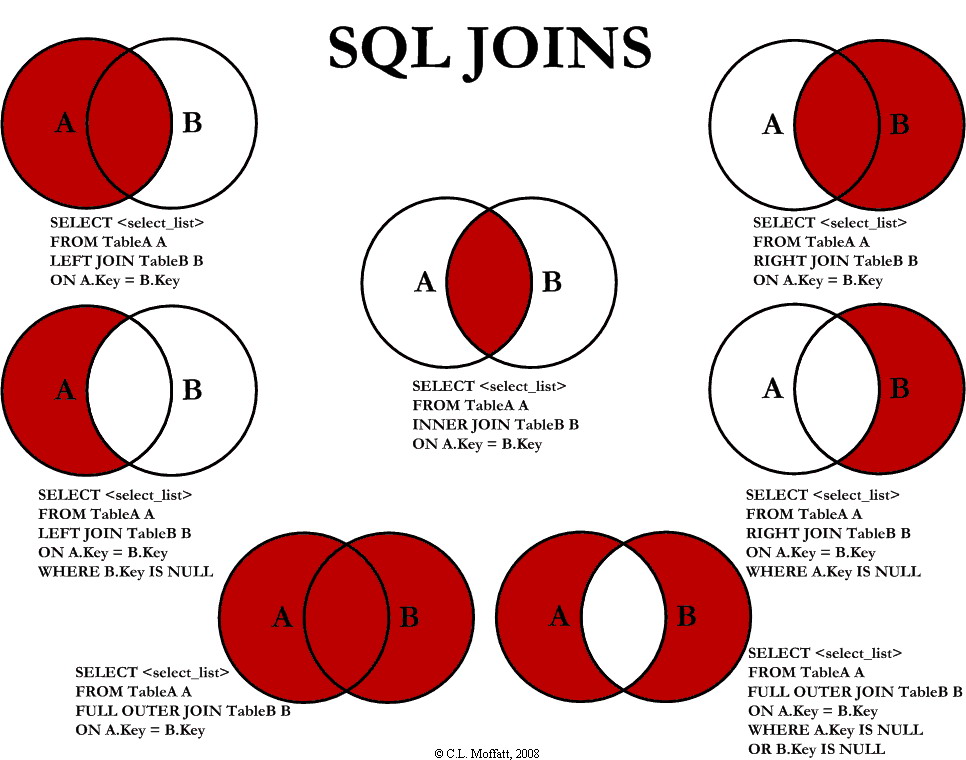
Using the code

I am going to discuss seven different ways you can return data from two relational tables. I will be excluding cross Joins and self referencing Joins. The seven Joins I will discuss are shown below:
  1. INNER JOIN
  2. LEFT JOIN
  3. RIGHT JOIN
  4. OUTER JOIN
  5. LEFT JOIN EXCLUDING INNER JOIN
  6. RIGHT JOIN EXCLUDING INNER JOIN
  7. OUTER JOIN EXCLUDING INNER JOIN
For the sake of this article, I'll refer to 5, 6, and 7 as LEFT EXCLUDING JOIN, RIGHT EXCLUDING JOIN, and OUTER EXCLUDING JOIN, respectively. Some may argue that 5, 6, and 7 are not really joining the two tables, but for simplicity, I will still refer to these as Joins because you use a SQL Join in each of these queries (but exclude some records with a WHERE clause).

Inner JOIN

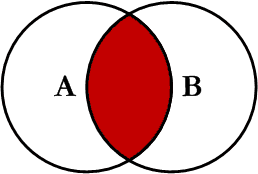
INNER_JOIN.png
This is the simplest, most understood Join and is the most common. This query will return all of the records in the left table (table A) that have a matching record in the right table (table B). This Join is written as follows:
SELECT <select_list> 
FROM Table_A A
INNER JOIN Table_B B
ON A.Key = B.Key

Left JOIN

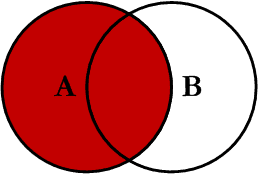
LEFT_JOIN.png
This query will return all of the records in the left table (table A) regardless if any of those records have a match in the right table (table B). It will also return any matching records from the right table. This Join is written as follows:
SELECT <select_list>
FROM Table_A A
LEFT JOIN Table_B B
ON A.Key = B.Key

Right JOIN

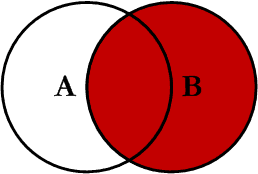
RIGHT_JOIN.png
This query will return all of the records in the right table (table B) regardless if any of those records have a match in the left table (table A). It will also return any matching records from the left table. This Join is written as follows:
SELECT <select_list>
FROM Table_A A
RIGHT JOIN Table_B B
ON A.Key = B.Key

Outer JOIN

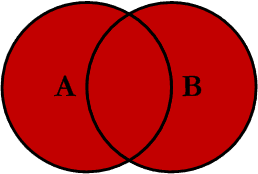
FULL_OUTER_JOIN.png
This Join can also be referred to as a FULL OUTER JOIN or a FULL JOIN. This query will return all of the records from both tables, joining records from the left table (table A) that match records from the right table (table B). This Join is written as follows:
SELECT <select_list>
FROM Table_A A
FULL OUTER JOIN Table_B B
ON A.Key = B.Key

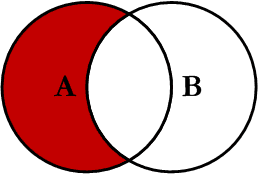
Left Excluding JOIN

LEFT_EXCLUDING_JOIN.png
This query will return all of the records in the left table (table A) that do not match any records in the right table (table B). This Join is written as follows:
SELECT <select_list> 
FROM Table_A A
LEFT JOIN Table_B B
ON A.Key = B.Key
WHERE B.Key IS NULL

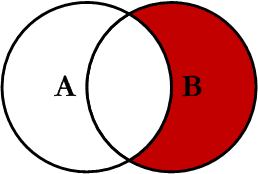
Right Excluding JOIN

RIGHT_EXCLUDING_JOIN.png
This query will return all of the records in the right table (table B) that do not match any records in the left table (table A). This Join is written as follows:
SELECT <select_list>
FROM Table_A A
RIGHT JOIN Table_B B
ON A.Key = B.Key
WHERE A.Key IS NULL

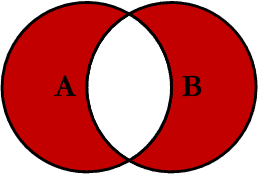
Outer Excluding JOIN

OUTER_EXCLUDING_JOIN.png
This query will return all of the records in the left table (table A) and all of the records in the right table (table B) that do not match. I have yet to have a need for using this type of Join, but all of the others, I use quite frequently. This Join is written as follows:
SELECT <select_list>
FROM Table_A A
FULL OUTER JOIN Table_B B
ON A.Key = B.Key
WHERE A.Key IS NULL OR B.Key IS NULL

Examples

Suppose we have two tables, Table_A and Table_B. The data in these tables are shown below:
TABLE_A
  PK Value
---- ----------
   1 FOX
   2 COP
   3 TAXI
   6 WASHINGTON
   7 DELL
   5 ARIZONA
   4 LINCOLN
  10 LUCENT

TABLE_B
  PK Value
---- ----------
   1 TROT
   2 CAR
   3 CAB
   6 MONUMENT
   7 PC
   8 MICROSOFT
   9 APPLE
  11 SCOTCH
The results of the seven Joins are shown below:
-- INNER JOIN
SELECT A.PK AS A_PK, A.Value AS A_Value,
       B.Value AS B_Value, B.PK AS B_PK
FROM Table_A A
INNER JOIN Table_B B
ON A.PK = B.PK

A_PK A_Value    B_Value    B_PK
---- ---------- ---------- ----
   1 FOX        TROT          1
   2 COP        CAR           2
   3 TAXI       CAB           3
   6 WASHINGTON MONUMENT      6
   7 DELL       PC            7

(5 row(s) affected)
-- LEFT JOIN
SELECT A.PK AS A_PK, A.Value AS A_Value,
B.Value AS B_Value, B.PK AS B_PK
FROM Table_A A
LEFT JOIN Table_B B
ON A.PK = B.PK

A_PK A_Value    B_Value    B_PK
---- ---------- ---------- ----
   1 FOX        TROT          1
   2 COP        CAR           2
   3 TAXI       CAB           3
   4 LINCOLN    NULL       NULL
   5 ARIZONA    NULL       NULL
   6 WASHINGTON MONUMENT      6
   7 DELL       PC            7
  10 LUCENT     NULL       NULL

(8 row(s) affected)
-- RIGHT JOIN
SELECT A.PK AS A_PK, A.Value AS A_Value,
B.Value AS B_Value, B.PK AS B_PK
FROM Table_A A
RIGHT JOIN Table_B B
ON A.PK = B.PK

A_PK A_Value    B_Value    B_PK
---- ---------- ---------- ----
   1 FOX        TROT          1
   2 COP        CAR           2
   3 TAXI       CAB           3
   6 WASHINGTON MONUMENT      6
   7 DELL       PC            7
NULL NULL       MICROSOFT     8
NULL NULL       APPLE         9
NULL NULL       SCOTCH       11

(8 row(s) affected)
-- OUTER JOIN
SELECT A.PK AS A_PK, A.Value AS A_Value,
B.Value AS B_Value, B.PK AS B_PK
FROM Table_A A
FULL OUTER JOIN Table_B B
ON A.PK = B.PK

A_PK A_Value    B_Value    B_PK
---- ---------- ---------- ----
   1 FOX        TROT          1
   2 COP        CAR           2
   3 TAXI       CAB           3
   6 WASHINGTON MONUMENT      6
   7 DELL       PC            7
NULL NULL       MICROSOFT     8
NULL NULL       APPLE         9
NULL NULL       SCOTCH       11
   5 ARIZONA    NULL       NULL
   4 LINCOLN    NULL       NULL
  10 LUCENT     NULL       NULL

(11 row(s) affected)
-- LEFT EXCLUDING JOIN
SELECT A.PK AS A_PK, A.Value AS A_Value,
B.Value AS B_Value, B.PK AS B_PK
FROM Table_A A
LEFT JOIN Table_B B
ON A.PK = B.PK
WHERE B.PK IS NULL

A_PK A_Value    B_Value    B_PK
---- ---------- ---------- ----
   4 LINCOLN    NULL       NULL
   5 ARIZONA    NULL       NULL
  10 LUCENT     NULL       NULL
(3 row(s) affected)
-- RIGHT EXCLUDING JOIN
SELECT A.PK AS A_PK, A.Value AS A_Value,
B.Value AS B_Value, B.PK AS B_PK
FROM Table_A A
RIGHT JOIN Table_B B
ON A.PK = B.PK
WHERE A.PK IS NULL

A_PK A_Value    B_Value    B_PK
---- ---------- ---------- ----
NULL NULL       MICROSOFT     8
NULL NULL       APPLE         9
NULL NULL       SCOTCH       11

(3 row(s) affected)
-- OUTER EXCLUDING JOIN
SELECT A.PK AS A_PK, A.Value AS A_Value,
B.Value AS B_Value, B.PK AS B_PK
FROM Table_A A
FULL OUTER JOIN Table_B B
ON A.PK = B.PK
WHERE A.PK IS NULL
OR B.PK IS NULL

A_PK A_Value    B_Value    B_PK
---- ---------- ---------- ----
NULL NULL       MICROSOFT     8
NULL NULL       APPLE         9
NULL NULL       SCOTCH       11
   5 ARIZONA    NULL       NULL
   4 LINCOLN    NULL       NULL
  10 LUCENT     NULL       NULL

(6 row(s) affected)
Note on the OUTER JOIN that the inner joined records are returned first, followed by the right joined records, and then finally the left joined records (at least, that's how my Microsoft SQL Server did it; this, of course, is without using any ORDER BY statement).
You can visit the Wikipedia article for more info here (however, the entry is not graphical).
I've also created a cheat sheet that you can print out if needed. If you right click on the image below and select "Save Target As...", you will download the full size image.

History

  • Initial release -- 02/03/2009.
  • Version 1.0 -- 02/04/2009 -- Fixed cheat sheet and minor typos.

License

This article, along with any associated source code and files, is licensed under The Code Project Open License (CPOL)

SELECT from nothing?

It's not consistent across vendors - Oracle, MySQL, and DB2 support dual:
SELECT 'Hello world'
  FROM DUAL
...while SQL Server, PostgreSQL, and SQLite don't require the FROM DUAL:
SELECT 'Hello world'
MySQL does support both ways.

HAVING

The SQL HAVING Clause

The HAVING clause was added to SQL because the WHERE keyword could not be used with aggregate functions.

HAVING Syntax

SELECT column_name(s)
FROM table_name
WHERE condition
GROUP BY column_name(s)HAVING conditionORDER BY column_name(s);

Wednesday, May 24, 2017

ORDER BY

The SQL ORDER BY clause is used to sort the data in ascending or descending order, based on one or more columns. Some databases sort the query results in an ascending order by default.

Syntax

The basic syntax of the ORDER BY clause is as follows −
SELECT column-list 
FROM table_name 
[WHERE condition] 
[ORDER BY column1, column2, .. columnN] [ASC | DESC];
You can use more than one column in the ORDER BY clause. Make sure whatever column you are using to sort that column should be in the column-list.

DISTINCT

The SQL SELECT DISTINCT Statement

The SELECT DISTINCT statement is used to return only distinct (different) values.
Inside a table, a column often contains many duplicate values; and sometimes you only want to list the different (distinct) values.
The SELECT DISTINCT statement is used to return only distinct (different) values.

SELECT DISTINCT Syntax

SELECT DISTINCT column1, column2, ...
FROM table_name

SELECT DISTINCT Examples

The following SQL statement selects only the DISTINCT values from the "Country" column in the "Customers" table:

Example

SELECT DISTINCT Country FROM Customers;
 
 
The following SQL statement lists the number of different (distinct) customer countries:

Example

SELECT COUNT(DISTINCT Country) FROM Customers;

Aggregate Functions


MIN returns the smallest value in a given column
MAX returns the largest value in a given column
SUM returns the sum of the numeric values in a given column
AVG returns the average value of a given column
COUNT returns the total number of values in a given column
COUNT(*) returns the number of rows in a table
Aggregate functions are used to compute against a "returned column of numeric data" from your SELECT statement. They basically summarize the results of a particular column of selected data. We are covering these here since they are required by the next topic, "GROUP BY". Although they are required for the "GROUP BY" clause, these functions can be used without the "GROUP BY" clause. For example:


SELECT AVG(salary)

FROM employee;
This statement will return a single result which contains the average value of everything returned in the salary column from the employee table.
Another example:

SELECT AVG(salary)


FROM employee

WHERE title = 'Programmer';
This statement will return the average salary for all employee whose title is equal to 'Programmer'
Example:

SELECT Count(*)

FROM employee;
This particular statement is slightly different from the other aggregate functions since there isn't a column supplied to the count function. This statement will return the number of rows in the employees table.

GROUP BY

The GROUP BY statement is often used with aggregate functions (COUNT, MAX, MIN, SUM, AVG) to group the result-set by one or more columns.

GROUP BY Syntax

SELECT column_name(s)
FROM table_name
WHERE condition
GROUP BY column_name(s)ORDER BY column_name(s);

Demo Database

Below is a selection from the "Customers" table in the Northwind sample database:
CustomerID CustomerName ContactName Address City PostalCode Country
1
Alfreds Futterkiste Maria Anders Obere Str. 57 Berlin 12209 Germany
2 Ana Trujillo Emparedados y helados Ana Trujillo Avda. de la Constitución 2222 México D.F. 05021 Mexico
3 Antonio Moreno Taquería Antonio Moreno Mataderos 2312 México D.F. 05023 Mexico
4
Around the Horn Thomas Hardy 120 Hanover Sq. London WA1 1DP UK
5 Berglunds snabbköp Christina Berglund Berguvsvägen 8 Luleå S-958 22 Sweden


SQL GROUP BY Examples

The following SQL statement lists the number of customers in each country:

Example

SELECT COUNT(CustomerID), Country
FROM Customers
GROUP BY Country;
The following SQL statement lists the number of customers in each country, sorted high to low:

Example

SELECT COUNT(CustomerID), Country
FROM Customers
GROUP BY Country
ORDER BY COUNT(CustomerID) DESC;

Demo Database

Below is a selection from the "Orders" table in the Northwind sample database:
OrderID CustomerID EmployeeID OrderDate ShipperID
10248 90 5 1996-07-04 3
10249 81 6 1996-07-05 1
10250 34 4 1996-07-08 2
And a selection from the "Shippers" table:
ShipperID ShipperName
1 Speedy Express
2 United Package
3 Federal Shipping

GROUP BY With JOIN Example

The following SQL statement lists the number of orders sent by each shipper:

Example

SELECT Shippers.ShipperName, COUNT(Orders.OrderID) AS NumberOfOrders FROM Orders
LEFT JOIN Shippers ON Orders.ShipperID = Shippers.ShipperID
GROUP BY ShipperName;

select the extreme from each group

Here are some common SQL problems, all of which have related solutions: how do I find the most recent log entry for each program? How do I find the most popular item from each category? How do I find the top score for each player? In general, these types of “select the extreme from each group” queries can be solved with the same techniques. I’ll explain how to do that in this article, including the harder problem of selecting the top N entries, not just the top 1.
This topic is related to numbering rows, which I just wrote about (see my articles about MySQL-specific and generic techniques to assign a number to each row in a group). Therefore I’ll use nearly the same table and data as I used in those articles, with the addition of a price column:
+--------+------------+-------+
| type   | variety    | price |
+--------+------------+-------+
| apple  | gala       |  2.79 | 
| apple  | fuji       |  0.24 | 
| apple  | limbertwig |  2.87 | 
| orange | valencia   |  3.59 | 
| orange | navel      |  9.36 | 
| pear   | bradford   |  6.05 | 
| pear   | bartlett   |  2.14 | 
| cherry | bing       |  2.55 | 
| cherry | chelan     |  6.33 | 
+--------+------------+-------+

Selecting the one maximum row from each group

Let’s say I want to select the most recent log entry for each program, or the most recent changes in an audit table, or something of the sort. This question comes up over and over on IRC channels and mailing lists. I’ll re-phrase the question in terms of fruits. I want to select the cheapest fruit from each type. Here’s the desired result:
+--------+----------+-------+
| type   | variety  | price |
+--------+----------+-------+
| apple  | fuji     |  0.24 | 
| orange | valencia |  3.59 | 
| pear   | bartlett |  2.14 | 
| cherry | bing     |  2.55 | 
+--------+----------+-------+
There are a few common solutions to this problem. All involve two steps: finding the desired value of price, and then selecting the rest of the row based on that.
One common solution is a so-called self-join. Step one is to group the fruits by type (apple, cherry etc) and choose the minimum price:
select type, min(price) as minprice
from fruits
group by type;
+--------+----------+
| type   | minprice |
+--------+----------+
| apple  |     0.24 | 
| cherry |     2.55 | 
| orange |     3.59 | 
| pear   |     2.14 | 
+--------+----------+
Step two is to select the rest of the row by joining these results back to the same table. Since the first query is grouped, it needs to be put into a subquery so it can be joined against the non-grouped table:
select f.type, f.variety, f.price
from (
   select type, min(price) as minprice
   from fruits group by type
) as x inner join fruits as f on f.type = x.type and f.price = x.minprice;
+--------+----------+-------+
| type   | variety  | price |
+--------+----------+-------+
| apple  | fuji     |  0.24 | 
| cherry | bing     |  2.55 | 
| orange | valencia |  3.59 | 
| pear   | bartlett |  2.14 | 
+--------+----------+-------+
Another common way to do this is with a correlated subquery. This can be much less efficient, depending on how good your system’s query optimizer is. You might find it clearer, though.
select type, variety, price
from fruits
where price = (select min(price) from fruits as f where f.type = fruits.type);
+--------+----------+-------+
| type   | variety  | price |
+--------+----------+-------+
| apple  | fuji     |  0.24 | 
| orange | valencia |  3.59 | 
| pear   | bartlett |  2.14 | 
| cherry | bing     |  2.55 | 
+--------+----------+-------+
Both queries are logically equivalent, though they may not perform the same.

Select the top N rows from each group

This is a slightly harder problem to solve. Finding a single row from each group is easy with SQL’s aggregate functions (MIN(), MAX(), and so on). Finding the first several from each group is not possible with that method because aggregate functions only return a single value. Still, it’s possible to do.
Let’s say I want to select the two cheapest fruits from each type. Here’s a first try:
select type, variety, price
from fruits
where price = (select min(price) from fruits as f where f.type = fruits.type)
   or price = (select min(price) from fruits as f where f.type = fruits.type
      and price > (select min(price) from fruits as f2 where f2.type = fruits.type));
+--------+----------+-------+
| type   | variety  | price |
+--------+----------+-------+
| apple  | gala     |  2.79 | 
| apple  | fuji     |  0.24 | 
| orange | valencia |  3.59 | 
| orange | navel    |  9.36 | 
| pear   | bradford |  6.05 | 
| pear   | bartlett |  2.14 | 
| cherry | bing     |  2.55 | 
| cherry | chelan   |  6.33 | 
+--------+----------+-------+
Yuck! That can be written as a self-join, but it’s just as bad (I leave it as an exercise for the reader). This gets worse as you go to higher numbers (top 3, top 4…). There are other ways to phrase the statement, but they all boil down to the same thing, and they’re all pretty unwieldy and inefficient.
There’s a better way: select the variety from each type where the variety is no more than the second-cheapest of that type.
select type, variety, price
from fruits
where (
   select count(*) from fruits as f
   where f.type = fruits.type and f.price <= fruits.price
) <= 2;
This is elegant, and lets you vary N without rewriting your query (a very good thing!), but it’s functionally the same as the previous query. Both are essentially a quadratic algorithm relative to the number of varieties in each type. And again, some query optimizers may not do well with this and make it quadratic with respect to the number of rows in the table overall (especially if no useful index is defined), and the server might get clobbered. Are there better ways? Can it be done with one pass through the data, instead of the many passes required by a correlated subquery? You know it can, or I wouldn’t be writing this, now would I?

Use UNION

If there’s an index on (type, price), and there are many more records to eliminate than to include in each group, a more efficient single-pass method (especially for MySQL, but also for some other RDBMSs) is to break the queries out separately and put a limit on each, then UNION them all back together. Here’s the syntax you need for MySQL:
(select * from fruits where type = 'apple' order by price limit 2)
union all
(select * from fruits where type = 'orange' order by price limit 2)
union all
(select * from fruits where type = 'pear' order by price limit 2)
union all
(select * from fruits where type = 'cherry' order by price limit 2)
Peter Zaitsev has written in detail about this technique, so I won’t go into it too much more here. If it suits your purposes, it can be a very good solution.
One note: use UNION ALL, not just UNION. It prevents the server sorting the results to eliminate duplicates before returning them. In this case there will be no duplicates, so I’m telling the server to skip that (useless, expensive) step.

Do it with user variables on MySQL

The UNION trick is an especially good idea when the results are a small fraction of the rows in the table and there is an index that can be used for sorting the rows. Another linear-time technique, which might be a good option in cases where you are selecting most of the rows from the table anyway, is user variables. This is MySQL-specific. Please refer to my previous post on how to number rows in MySQL for the gory details of why this works:
set @num := 0, @type := '';

select type, variety, price
from (
   select type, variety, price,
      @num := if(@type = type, @num + 1, 1) as row_number,
      @type := type as dummy
  from fruits
  order by type, price
) as x where x.row_number <= 2;
This isn’t one pass through the table, by the way. The subquery is implemented as a temporary table behind the scenes, so filling it with data is one pass; then selecting every row from it and applying the WHERE clause is another. However, twice through is still O(n) with respect to the table size. That’s a lot better than correlated subqueries, which are O(n2) with respect to the group size – even moderate group sizes cause bad performance (say there are five varieties of each fruit. That’s on the order of 25 passes through the table, all told).

One-pass technique on MySQL… maybe?

If you want to leave your queries up the the query optimizer’s whims, you can try this technique, which builds no temporary tables and makes just one pass through:
set @num := 0, @type := '';

select type, variety, price,
      @num := if(@type = type, @num + 1, 1) as row_number,
      @type := type as dummy
from fruits
group by type, price, variety
having row_number <= 2;
This theoretically ought to work if MySQL orders by the GROUP BY criteria, which it sometimes does for efficiency and to produce the expected results. Does it work? Here’s what it returns on MySQL 5.0.27 on Windows:
+--------+----------+-------+------------+--------+
| type   | variety  | price | row_number | dummy  |
+--------+----------+-------+------------+--------+
| apple  | gala     |  2.79 |          1 | apple  |
| apple  | fuji     |  0.24 |          3 | apple  |
| orange | valencia |  3.59 |          1 | orange |
| orange | navel    |  9.36 |          3 | orange |
| pear   | bradford |  6.05 |          1 | pear   |
| pear   | bartlett |  2.14 |          3 | pear   |
| cherry | bing     |  2.55 |          1 | cherry |
| cherry | chelan   |  6.33 |          3 | cherry |
+--------+----------+-------+------------+--------+
Look closely… it’s returning rows one and three from each group, and they’re not numbered in order of increasing price? Huh? But the HAVING clause says the row_number should be no greater than 2! Here’s what it returns on version 5.0.24a on Ubuntu:
+--------+------------+-------+------------+--------+
| type   | variety    | price | row_number | dummy  |
+--------+------------+-------+------------+--------+
| apple  | fuji       |  0.24 |          1 | apple  |
| apple  | gala       |  2.79 |          1 | apple  |
| apple  | limbertwig |  2.87 |          1 | apple  |
| cherry | bing       |  2.55 |          1 | cherry |
| cherry | chelan     |  6.33 |          1 | cherry |
| orange | valencia   |  3.59 |          1 | orange |
| orange | navel      |  9.36 |          1 | orange |
| pear   | bartlett   |  2.14 |          1 | pear   |
| pear   | bradford   |  6.05 |          1 | pear   |
+--------+------------+-------+------------+--------+
Look, this time everything is numbered 1 and every row is returned. Wonky. This is exactly what the MySQL manual page on user variables warns about.
This technique is pretty much non-deterministic, because it relies on things that you and I don’t get to control directly, such as which indexes MySQL decides to use for grouping. However, if you need to use it – and I know there are some folks out there who do, because I’ve consulted for them – you can still tweak it. We’re getting into the realm of really bastardizing SQL, but the results above came from a table without indexes other than the primary key on (type, variety). What happens if I add an index MySQL can use for grouping?
alter table fruits add key(type, price);
Nothing changes, and EXPLAIN shows why: the query doesn’t use the index I just added. Why? Because the grouping is on three columns, and the index is only on two. In fact, the query is using a temp table and filesort anyway, so this is still not achieving the once-through goal. I can force it to use the index:
set @num := 0, @type := '';

select type, variety, price,
      @num := if(@type = type, @num + 1, 1) as row_number,
      @type := type as dummy
from fruits force index(type)
group by type, price, variety
having row_number <= 2;
Let’s see if that works:
+--------+----------+-------+------------+--------+
| type   | variety  | price | row_number | dummy  |
+--------+----------+-------+------------+--------+
| apple  | fuji     |  0.24 |          1 | apple  | 
| apple  | gala     |  2.79 |          2 | apple  | 
| cherry | bing     |  2.55 |          1 | cherry | 
| cherry | chelan   |  6.33 |          2 | cherry | 
| orange | valencia |  3.59 |          1 | orange | 
| orange | navel    |  9.36 |          2 | orange | 
| pear   | bartlett |  2.14 |          1 | pear   | 
| pear   | bradford |  6.05 |          2 | pear   | 
+--------+----------+-------+------------+--------+
Ah, now we’re cooking! It did what I wanted, without a filesort or temporary table. Another way to do this, by the way, is to take variety out of the GROUP BY so it uses the index on its own. Because this selects a non-grouped column from a grouped query, this only works if you are running with ONLY_FULL_GROUP_BY mode turned off, which I hope you are not doing without good reason.

Other methods

Be sure to check the comments for user-contributed methods. There are some really novel approaches. I always learn so much from your comments… thank you!

Conclusion

Well, that’s it. I’ve shown you several ways of solving the common “get the extreme row from each group” query, and then moved on to how you can get the top N rows from each group in various ways. Then I dove into MySQL-specific techniques which some (including myself, depending on my mood) would regard as mildly foolish to utterly stupid. But if you need the last bit of speed out of your server, you sometimes have to know when to break the rules. And for those who think this is just MySQL foolishness, it’s not; I’ve seen people desperately do these types of things on other platforms too, such as SQL Server. There are hacks and tweaks on every platform, and people who need to use them.
I hope you’ve enjoyed and profited from this discussion. If you did, maybe you’d like to subscribe for convenient notification of future articles. Happy coding!